Article
The remarkable simplicity of Mamluk's enterprise offering
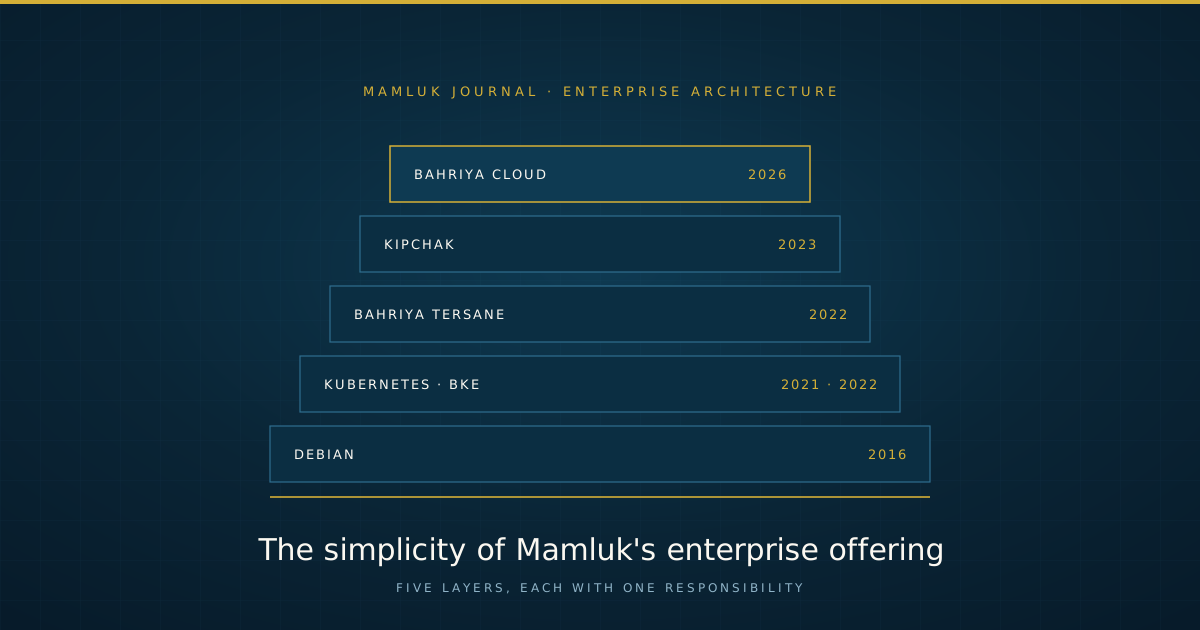
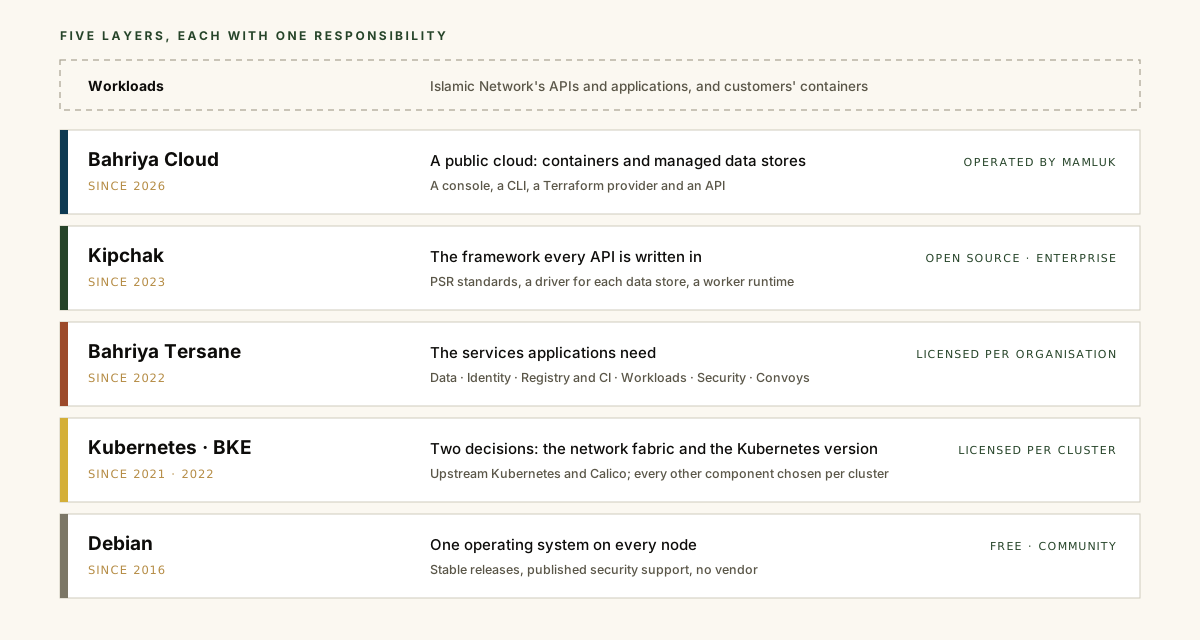
Mamluk’s enterprise offering is a stack of five layers. Debian is the operating system. The Bahriya Kubernetes Engine (BKE) turns a group of Debian machines into a Kubernetes cluster and keeps a fleet of clusters on the same tested versions. Bahriya Tersane is a catalogue of Helm charts that turns a cluster into a platform: databases, caches, identity, a registry, continuous integration and the shapes in which applications are deployed. Kipchak is the framework in which the APIs and applications above it are written. Bahriya Cloud, a public cloud, is built from all four.
Each layer has one responsibility, and each is small enough to be described completely. This article does so: what each layer decides, what it leaves to the organisation, how it is configured, how it is upgraded, and how the layers fit together. It closes with where each layer came from, and with the ways an enterprise can take one layer or the whole stack.
What simplicity means here
Simplicity in this stack is not a short feature list. It is four properties, held at every layer.
Each layer makes as few decisions as it can. A layer decides only what the layer above cannot work without, and leaves every other decision to the organisation that runs it.
Each layer is built from parts that can be named. Debian, Kubernetes, Calico, Kong, Longhorn, MySQL, Valkey and Keycloak are upstream projects with their own documentation, communities and security advisories. Where Mamluk has written something of its own, such as Kipchak or the workload charts, it is published and its source is available to the organisation that uses it.
Each layer is configured in files the organisation keeps. A cluster is
described by its config.yaml and one values file per component. A chart
release is described by its values file. A Kipchak service is described by
its own source and configuration. All of them belong in the organisation’s
source control, and an auditor can read them without logging in to anything.
Each layer stands on its own. A layer depends on the interface of the one beneath it, not on its brand. Kipchak runs wherever a container runs. The Tersane charts install on any conformant Kubernetes distribution. BKE installs on Debian, which anyone may run without a licence.
Debian: one operating system
Every node in the stack runs Debian. It was chosen for three reasons. Its stable releases change slowly and predictably, so a node that has been patched behaves the same way the next day. Its security support is long and its timetable is published in advance. It is maintained by an independent community project rather than a vendor, so the operating system carries no subscription and no commercial roadmap that the estate must follow.
The decision is kept narrow on purpose. BKE checks every node before it installs anything, and refuses a node that does not run Debian or whose operating system it cannot identify. One operating system is one set of package versions, one kernel lineage and one security feed to test against, and every BKE release is tested on that base alone.
BKE also changes as little of the machine as it can. It installs the packages a node needs to run Kubernetes, such as the kubelet, kubeadm, kubectl and containerd, and leaves the SSH configuration untouched unless the administrator asks it to manage SSH. Its scripts are read from the network and run without being written to disk, and anything they fetch, Helm included, goes to a private temporary directory that is removed when the script exits, whether it succeeded or not. The organisation’s own Helm, if it has one, is never replaced.
The Bahriya Kubernetes Engine: a fleet of clusters
One Kubernetes cluster can be installed and maintained by hand. Several cannot, not without the clusters drifting apart. The Bahriya Kubernetes Engine exists to keep a fleet of clusters on versions that have been tested together.
Two decisions
BKE is upstream Kubernetes, installed with kubeadm, with exactly two decisions
made for every cluster: the network fabric, which is Calico with WireGuard
encryption between nodes, and the Kubernetes version, pinned to the exact
patch. Everything else is a component the organisation enables or leaves out,
with one line per component in config.yaml:
| Component | What it provides |
|---|---|
| Kong | Ingress and API gateway, run without a database, so that an upgrade is a replacement of pods |
| cert-manager | Certificates, from whichever issuer the organisation configures |
| Longhorn | Replicated block storage |
| Kuma | A service mesh, enabled one namespace at a time |
| Fluent Bit | Log shipping to the organisation’s log platform |
| netdata | Monitoring, including Prometheus-format metrics |
| metrics-server | The resource metrics that autoscaling depends on |
A component that is not enabled is not installed. A component the organisation already runs can be adopted in place, by naming its existing Helm release.
A handful of commands
A cluster is created, changed and upgraded with a small number of scripts, each with one job:
| Command | What it does |
|---|---|
check.sh |
Checks a node before anything is installed or upgraded on it |
register.sh |
Registers the cluster’s licence, once |
install.sh |
Prepares a node; on the first control-plane node, creates the cluster |
apply.sh |
Installs or changes the enabled components to match config.yaml |
upgrade.sh |
Moves a node to a newer BKE version |
version.sh |
Reports what a node is running |
Nothing changes unless the administrator says so. A script that would change
the cluster first reports what it will do, and does it only when it is run
again with --commit.
Configuration without secrets
config.yaml never contains a secret. Each credential a component needs is
named in config.yaml and held on the node as a file under
/etc/bke/secrets.d/, from which BKE creates the Kubernetes Secret; an
organisation that already uses an external secrets manager can supply the
Secret itself instead. Because the file holds no secret, it can be sent to
Mamluk’s API, which renders the values file for each component from it and
refuses an invalid configuration with a diagnostic before anything is
installed. The node parses nothing.
The rendered values files belong to the organisation, which may edit them. At the next upgrade, BKE shows the difference between the organisation’s edited file and the new release’s file, and waits for the administrator to agree.
Upgrades by their effect
One BKE version pins the whole set: Kubernetes, Calico and every component, each to an exact patch release. Every image and chart is mirrored by Mamluk, and a published tag is never pushed again, so two installations of one BKE version are the same cluster. Releases are classified by what they do to a running cluster. A patch release changes component patches only and never drains a node. A jump across Kubernetes minor versions that are not adjacent is refused, because Kubernetes itself does not support it.
Login and independence
People log in to a cluster with their organisation’s own identity provider, through OIDC. BKE installs nothing for this: the API server is configured to trust the provider directly.
No management plane of Mamluk’s sits in the path of the cluster’s traffic. If the licence lapses, or Mamluk cannot be reached, the cluster continues to serve its workloads; only installation and upgrade pause. The full documentation is on the BKE website, and the case for this design is set out in Kubernetes built from parts.
Bahriya Tersane: from cluster to platform
A cluster is not yet a platform. Applications need databases, caches, an identity provider, a registry, source control and a way to build and deploy, and each of those needs replication, backups and an upgrade path that someone has decided. Bahriya Tersane holds those decisions in a catalogue of Helm charts, organised by function:
| Group | Charts |
|---|---|
| Data | MySQL, Valkey, Memcached |
| Identity | Keycloak |
| Registry and CI | Harbor, OneDev, Concourse |
| Workloads | safeena for web services, khadim for workers, saat for scheduled jobs |
| Security | ClamAV, as a shared malware scanner |
Upstream software keeps its upstream name. The three workload charts are Mamluk’s own, and carry Arabic and Turkish names: safeena is a ship, khadim a servant and saat an hour.
What a chart decides
A generic chart installs the software and leaves its operation to the reader. A Tersane chart carries the operational decisions as well: resource limits, disruption budgets, anti-affinity, RBAC, network policies and backups. Three examples show the depth.
MySQL has two modes. Standard mode runs a single primary with optional read replicas. HA Cluster mode runs Group Replication with automatic failover. The chart seeds a new member by cloning an existing one. A replica that has fallen so far behind that the primary no longer holds the logs it needs detects the condition and clones itself again, without an operator’s intervention. The chart also supports point-in-time recovery.
Valkey has three topologies behind a single mode setting: a standalone
instance, a primary with replicas and Sentinel for failover, or a sharded
cluster. Each ships with TLS, access control lists, persistence, backups to
S3-compatible storage, a metrics exporter and a network policy. It follows the
conventions of the MySQL chart, so an engineer who has operated one can read
the other.
safeena, khadim and saat are the three shapes in which an application is deployed: a web service behind Kong with TLS, plugins, autoscaling and health probes; a worker with no public ingress; and a job on a schedule. An application team states its image and its requirements, and the chart supplies the rest.
Delivery and scope
The charts are delivered from a private chart repository, and the images from a private registry, with a separate credential for each. Each release is installed with a values file that the organisation keeps. The data each service holds stays in that project’s own format, so it can be read without Tersane.
Industry-specific additions, called Convoys, are installed on top of the functional groups; the first is for banking. Tersane is sold with or without BKE. Its defaults assume a BKE cluster, so an organisation running another distribution supplies the equivalent ingress, storage and certificate services itself, or engages Mamluk to do so.
Kipchak: one framework for every API
Kipchak is a PHP API framework built on Slim and optimised for FrankenPHP in worker mode, in which the application is loaded once and serves many requests rather than being started for each one. It serves Mamluk’s own production traffic at over 3,000 requests per second, using substantially fewer resources than an equivalent Symfony or Laravel service.
A small core
The core is deliberately small: a bootstrap, base classes, request and
response helpers, and two interfaces, one for drivers and one for middleware.
A Kipchak service has three folders that the core loads in order: drivers/,
which registers connections to data stores and services; middlewares/,
which registers what runs around every request; and routes/, which registers
the API itself. A new service starts from the starter project and is a working
API before its first route is written.
Drivers and middleware as packages
Everything beyond the core is a separate package, installed only where it is used. There are more than twenty drivers, covering Valkey, Memcached, Doctrine, CouchDB, Kafka, RabbitMQ, OpenSearch, S3-compatible storage, SFTP and others, and middleware for JWT, JWKS, HMAC and API-key authentication, usage metering, quotas and the Subashi web application firewall. A service carries the packages it uses and nothing else, which keeps its dependencies, its image and its audit as small as the service itself.
The core is open source and free. Kipchak Enterprise adds enterprise drivers and middleware, delivered as source through an authenticated Composer repository, and support from the people who maintain the framework. An expired licence never interferes with software that is already running.
Kipchak does not depend on the layers beneath it. A Kipchak service is a container image, and it runs wherever a container runs.
Bahriya Cloud: the stack in use
Bahriya Cloud reached general availability on 31 August 2026. It is a public cloud, used in the same way as AWS, Azure or DigitalOcean: customers sign up, deploy containers and managed data stores through a console, a CLI, a Terraform provider or an API, and pay for what they use. It is not sold as an enterprise product.
It is, however, the most complete demonstration of the four layers beneath it. Its API is written in Kipchak. Its managed services are Tersane charts. It runs on BKE clusters, and those clusters run on Debian. An enterprise considering the stack can see every layer of it in operation, under public load, before it licenses any part of it.
Where each layer came from
None of the layers was designed in advance as part of a product range. Each was added when the workload above it required it. That workload was Islamic Network’s APIs and applications, which began with the AlAdhan prayer times API in 2013.
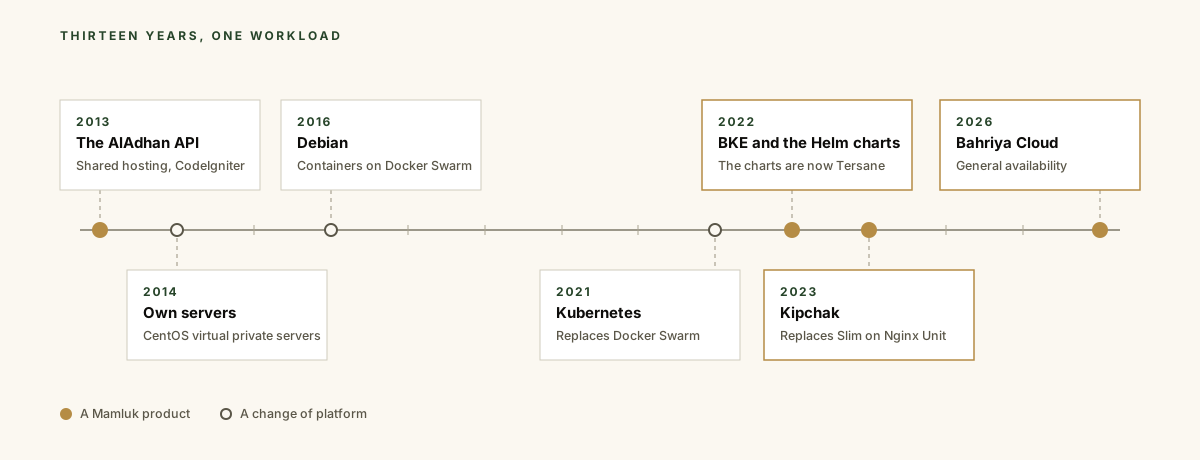
The services moved from shared hosting to CentOS servers in 2014, to containers on Debian under Docker Swarm in 2016, and to Kubernetes in 2021. The installation and upgrade of those clusters became BKE in 2022, and the charts for the services they ran began the same year. The application code moved from CodeIgniter to Slim, first under Apache and then under Nginx Unit; by 2023 Islamic Network ran more than a dozen APIs, processing over a billion queries a month, and what they had in common became Kipchak.
Each layer has carried that workload in production since:
| Layer | In production since | Workload |
|---|---|---|
| Debian | 2016 | Every Mamluk service and node |
| Kubernetes, then BKE | 2021, then 2022 | Every Mamluk cluster |
| Bahriya Tersane | 2022 | Mamluk’s data stores, identity, registry and deployments |
| Kipchak | 2023 | Islamic Network’s APIs, and Bahriya Cloud’s API |
| Bahriya Cloud | 2026 | Customers’ containers and data stores |
At the end of 2024 Islamic Network served up to 60 million requests a day to more than 1,500 developers, and the volume has grown since.
A toolkit, or the whole
Because each layer stands on its own, an organisation can take as much or as little of the stack as it needs.
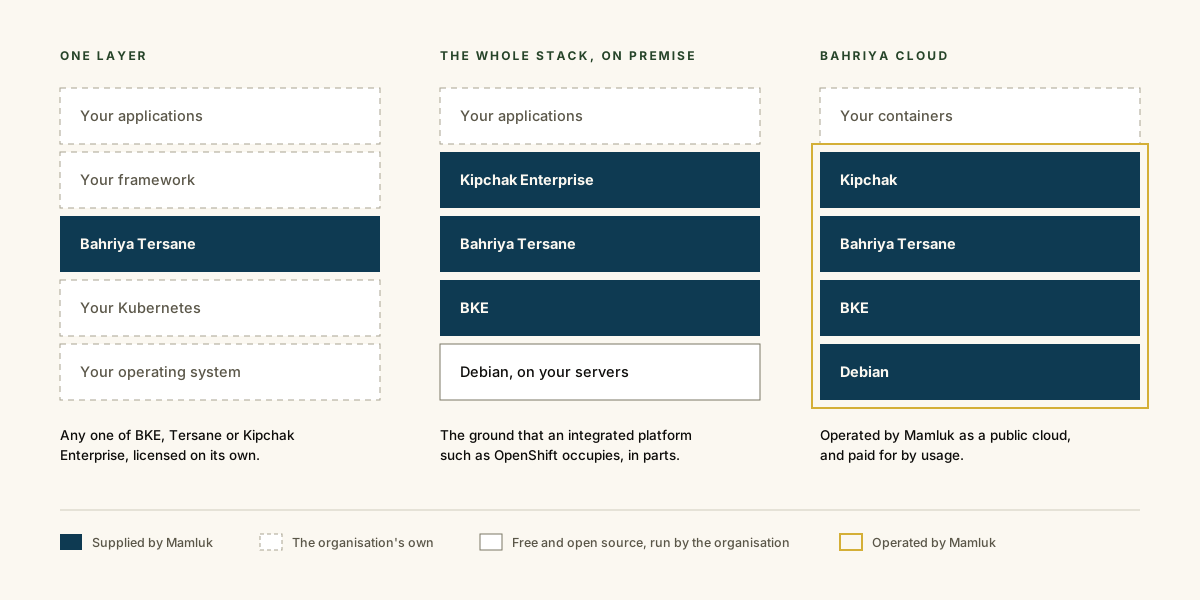
One layer. An organisation with an established Kubernetes estate can take Tersane for its data stores, registry and CI. A development team that already has a platform can take Kipchak Enterprise for its APIs. An organisation that wants its own clusters, and has its own services above them, can take BKE. Each is licensed separately, and none requires the others.
The whole stack, on premise. BKE, Tersane and Kipchak together, on Debian, on the organisation’s own servers, provide the ground that an integrated platform such as OpenShift occupies: clusters, the services applications need, and a framework to write the applications in. The difference is that every part is upstream or published, every part is named and versioned, and every part can be replaced without replacing the others. What that difference costs and saves is worked through in What three clusters cost a bank and on the BKE cost-of-ownership page.
Bahriya Cloud. An organisation that wants none of the operation can deploy its containers on Bahriya Cloud and use the stack as a service, with Mamluk running every layer.
What the approach asks of the organisation
A stack that makes few decisions leaves the remaining decisions with the organisation. An organisation that takes the whole stack on premise chooses which BKE components each cluster carries, which Tersane charts each application uses, and how its own services connect to them. Mamluk’s consulting and support can inform those choices, but they remain the organisation’s own, as they should for the people accountable for the estate.
In return, the organisation receives a stack in which every layer has run production traffic for years, can be read in full, and can be changed one layer at a time. The products page lists each layer, a 14-day BKE trial is self-service at console.maml.uk, and every other conversation begins on the contact page.